Your Business Doesn’t Need Another Project Management Tool. It Needs a Connected Operating System.
Discover how Grapevine Workplace connects client management, contracts, projects, communication and AI to reduce operational friction and protect margins for agencies and consulting firms.

Your agency probably doesn't have a project management problem. You have a problem connecting everything that happens before, during, and after a project.
A prospect becomes a client in your CRM. Someone prepares a contract in another tool. Billing happens somewhere else. A project manager builds the delivery plan. Meetings produce decisions that live in transcripts, inboxes and chat messages. Your client asks for another status update because they cannot see what's happening.
Every individual tool might be working exactly as intended. But your business is still doing the work of connecting them.
For consultants, agencies and professional services companies, this fragmentation creates costs that rarely appear as separate line items. Employees spend time locating information, repeating work, managing handoffs and switching between applications. Those activities consume capacity that could otherwise support delivery and client relationships.
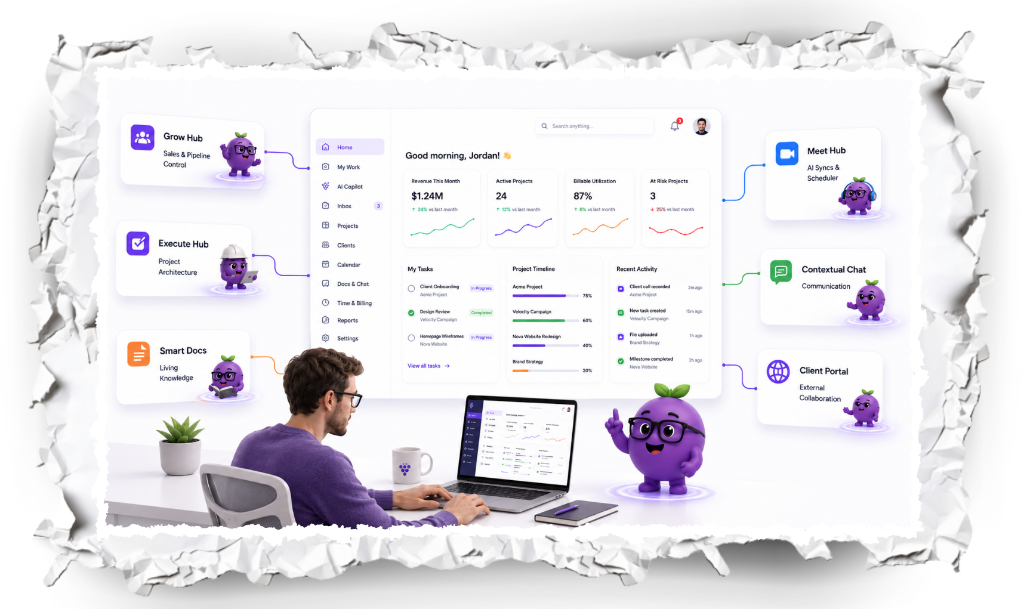
Grapevine Workplace connects client management, business operations, project delivery, communication, people and AI in one operating environment. The objective isn't merely fewer tabs. It's to preserve context as work moves through the business, reduce avoidable coordination and protect margins.
Quick answer: What is an agency operating system?
An agency operating system is a connected environment for managing commercial, operational and people-related work in a service business. It brings together client relationships, contracts, onboarding, projects, communication, knowledge, payments and team activity so employees can carry context forward without unnecessary manual coordination. Grapevine Workplace is designed around this model.
The hidden cost of disconnected agency operations
The cost of operating an agency extends beyond salaries, software subscriptions and overhead. There is another expense: the time employees spend coordinating work instead of completing it.
Consider an ordinary engagement. Sales closes a deal, but important discovery details don't reach delivery. The project manager schedules another call to reconstruct requirements. An account manager re-enters information already in the CRM. Someone searches through email for the final agreement, while another employee cannot find a decision from an earlier meeting.
Together, these activities create an operational burden that reduces the capacity available for client work. In its 2023 Anatomy of Work Global Index, Asana reported that surveyed knowledge workers spent 58% of their day on coordination activities it calls work about work. This was cross-industry research, not a current estimate for agencies. Microsoft's 2025 Work Trend Index similarly reported widespread perceptions of fragmented work.
For a business that sells expertise, inefficient coordination can become a margin problem.
Where fragmentation affects agency margins
| Operational problem | Where the cost appears |
|---|---|
| Repeated data entry | Administrative time and avoidable coordination |
| Weak sales-to-delivery handoffs | Rework, clarification, and project delays |
| Scattered meeting decisions | Missed follow-ups and repeated conversations |
| Disconnected client communication | Account-management overhead |
| Overlapping software subscriptions | Licensing and integration maintenance |
| Unclear priorities and ownership | Delivery delays and inefficient allocation |
| Unnoticed workload pressure | Delivery disruption and retention risk |
These costs may surface indirectly as lower effective project rates, higher delivery costs, reduced capacity and pressure on employees. An agency can be busy while consuming more effort than necessary to deliver the work.
Why another project management tool won't necessarily solve the problem
Project management software answers essential delivery questions: What needs to happen? Who owns the task? When is it due? Is the project progressing?
But an agency also needs to manage how work is sold, scoped, contracted, staffed, communicated, delivered, billed and supported. When those activities live separately, project management becomes another tool employees must keep updated.
A task may say a deliverable is ready, but does the account manager know what the client agreed to? Can the team find the current contract? Have yesterday's meeting decisions become follow-up work? Can the client locate the approved files?
Project management software versus an agency operating system
| Project management tool | Connected agency operating system |
|---|---|
| Organizes tasks and projects | Connects client relationships to delivery |
| Tracks assignments and deadlines | Preserves client context across work and communication |
| Provides project-level visibility | Connects commercial, operational and client information |
| Often integrates surrounding activities | Brings more of those activities into a shared environment |
| Primarily manages project execution | Supports the client relationship and operations around the project |
A connected operating system doesn't have to replace every specialist application. It should connect the business processes that belong together, preserve context and reduce the human work needed to keep them aligned.
What connected agency operations look like
From disconnected tools to connected delivery
Typical disconnected stack
Separate records, repeated entry and manual handoffs
Grapevine Workplace
Shared client context · Communication · Knowledge · Employee signals · Figgy AI
The difference isn't simply the number of features on a pricing page. It's whether employees can use relevant information from one part of the business when they need it in another.
Meet Grapevine Workplace: an operating system built for connected work
Grapevine Workplace is designed for organizations where managing the client relationship and managing delivery are inseparable: marketing agencies, consulting firms, creative studios, IT services providers and other professional services companies.
Instead of treating each client interaction as an isolated record, Grapevine connects client and company information with workspaces, projects, contracts, payments, meetings, communication and the resources used to deliver an engagement.
What Grapevine Workplace includes
- CRM: Prospects, companies, contacts and client relationships.
- Contracts and Stripe: Commercial agreements linked with payment workflows.
- Workspaces and projects: Client work, tasks, files, forms, documents and shared updates.
- Client portals: Relevant client-facing resources and progress without exposing private internal work.
- Communication and meetings: Chat, Gmail, Google Calendar, video conferencing and Fathom meeting intelligence.
- Knowledge and playbooks: Reusable guidance and institutional knowledge close to execution.
- Employee profiles and weekly pulse surveys: Recurring employee and team feedback alongside work context.
- Figgy AI: Assistance across connected workspace, client, document, meeting and task context, subject to workflow and permissions.
From client acquisition to ongoing delivery
- Manage the relationship. Keep prospect, company and discovery information in the CRM.
- Connect contracts and payments. Preserve commercial context alongside Stripe payment workflows.
- Start onboarding. Use intake forms and workspaces to collect what's needed to begin.
- Deliver the work. Organize projects, tasks, documents, files and updates in the client workspace.
- Connect meetings and communication. Keep decisions and conversations close to the people responsible for acting on them.
- Maintain the relationship. Give clients relevant progress and resources through the client portal while preserving internal delivery context.
Not every handoff must be automated for the operating model to help. Even when employees review and approve the next step, shared information can reduce repeated entry and unnecessary clarification.
How a connected operating system helps protect margins
1. Reduce unbillable administrative work
Connecting records, workspaces and communications reduces the effort of copying information across systems. Project managers spend less time reconstructing what was sold; account managers spend less time chasing status; consultants can find the information needed for their next deliverable. That can release capacity for paid client work and higher-value activities.
2. Reduce rework and protect scope
Rework often begins with missing information. A client makes a decision during a meeting, someone records it privately, and delivery continues from an outdated understanding. Connected meetings, documents, tasks and workspaces make it easier to preserve decisions and act on them. Accessible agreements provide context for discussing scope changes.
3. Reduce unnecessary software overlap
Service companies frequently adopt tools to solve immediate needs without revisiting the whole operating model. Over time, overlapping project, communication, document and client-portal subscriptions can add expense and maintenance effort. Consolidating appropriate functions helps control these costs while retaining specialized tools where their depth is essential.
4. Reduce the cost of client coordination
Client communication is essential; repeatedly assembling routine updates is not. Connected client portals help agencies make relevant files, progress and resources accessible while keeping internal execution context nearby.
5. Identify employee pressure before it disrupts delivery
Capacity is not only a scheduling question. Employees can appear available while dealing with unclear ownership, changing priorities or excessive meetings. Weekly employee and team pulse surveys provide recurring feedback that managers can investigate alongside project activity.
How to measure whether connected operations are saving money
| Metric | What to measure |
|---|---|
| Administrative hours | Time spent searching for information, manually updating systems and entering the same data twice |
| Effective project rate | Project revenue divided by total labor hours consumed |
| Rework hours | Labor spent correcting or repeating work |
| Software spend | Subscription, integration and maintenance costs |
| Onboarding time | Time from signed agreement to a delivery-ready workspace |
| Client response time | Time to resolve requests and provide updates |
| Employee workload signals | Weekly trends in reported pressure, clarity and confidence |
Record a baseline before changing systems and compare results over time. Better workflows create opportunities for savings; they don't guarantee an increase in margin or revenue.
Why connected operations matter for consultants, agencies and service companies
Consultants: keep client knowledge attached to the engagement
Consulting work depends on discovery, workshops, stakeholder interviews and recurring meetings. When this information is scattered across personal notes and inboxes, colleagues struggle to reconstruct the engagement. Connected workspaces, Fathom meeting information and accessible knowledge help preserve decisions and repeatable delivery methods.
Agencies: connect the commercial promise to delivery
Agencies often divide work among sales, account management, strategy, creative teams and project delivery. Connecting CRM records, contracts, intake, project workspaces and client portals helps preserve the original commercial context as employees execute the work.
Professional services firms: connect specialists, operations and relationships
Services businesses rely on specialized employees working across several clients and deadlines. Grapevine brings work, communication, institutional knowledge, employee profiles and weekly pulse feedback into the same broader environment so managers can investigate delivery challenges without relying on isolated records.
| Service business | What connected operations address |
|---|---|
| Consulting firms | Preserving discovery, decisions, knowledge and follow-through across engagements |
| Marketing and creative agencies | Connecting the sales promise, scope, onboarding, production and client experience |
| Professional services firms | Coordinating specialists, institutional knowledge, client information and employee feedback |
Integrations: connecting tools the agency already uses
An operating system doesn't need to replace everything. It needs to make information from essential applications useful in daily work. Grapevine integrates with Stripe, Fathom, Google Calendar, Gmail and Slack.
- Stripe: Connect contracts with payment collection.
- Fathom: Bring meeting recordings, transcripts, summaries and action items into the meeting workflow.
- Google Calendar: Connect scheduled events, attendees and meeting information.
- Gmail: Keep email and follow-up closer to client and project context.
- Slack: Connect team communication and notifications with agency operations.
The value of an integration isn't the connection alone. It's what employees can do with information after it enters the system.
AI becomes more useful when it understands the work
AI alone cannot resolve fragmented operations. An assistant generating a document without the relevant contract, project context or meeting decision may still leave employees responsible for collecting all the necessary information.
Figgy is designed to use Grapevine's connected workplace context. Depending on the workflow and permissions, it can assist with information and actions involving workspaces, CRM records, tasks, documents, knowledge, meetings, contracts, email and tables. Employees remain responsible for review and approvals where appropriate.
The goal is to shorten the distance between information and execution.
Don't forget the people doing the work
Software consolidation can't substitute for thoughtful organizational design. An agency can connect every application and still struggle with unclear ownership, unsustainable workloads or weak management practices.
Grapevine's employee profiles and weekly employee and team pulse surveys help organizations collect recurring feedback alongside their work context. A project status shows whether work is moving; pulse feedback may indicate that the people responsible are experiencing conflicting priorities, low confidence or excess pressure.
These surveys complement rather than replace capacity planning or meaningful conversations with employees.
When should an agency consider a connected operating system?
It may be time to rethink your operating model when employees regularly enter the same information twice, client updates require collecting data from multiple applications, discovery needs to be repeated after a deal is won, meeting decisions are lost, or overlapping subscriptions and unclear workloads are becoming expensive.
Before adopting a new system, map the processes creating the most coordination cost. Identify which specialized applications should remain and which activities can be consolidated without disrupting client delivery. The point is to simplify work, not create another costly implementation.
How to evaluate the financial impact
Measure an operating-system investment against business outcomes, not merely its feature count. Establish a baseline for administrative hours, software costs, onboarding time, rework and the effective labor consumed by projects. Then compare the results after adoption.
Not all recovered time immediately becomes revenue. Some may improve responsiveness, reduce after-hours work or create room to meet existing client commitments. What matters is the value gained relative to licensing, training, implementation and maintenance costs.
A connected business is more than a collection of tools
A successful agency needs continuity between the relationship it sells, the agreement it makes, the employees it assigns, the work it delivers and the experience it provides its clients. When those activities are disconnected, employees become the integration layer holding everything together.
Grapevine Workplace brings client management, contracts, payments, projects, communication, meetings, knowledge, employee feedback and AI closer together. The objective is fewer unnecessary handoffs, more consistent delivery, less administrative friction and better-informed decisions that help protect margins.
Connect your operations to your client relationships.
Explore how Grapevine Workplace brings the commercial, operational and human sides of running a service business into one connected environment.
Explore Grapevine Workplace →Related agency operations guides
- The Complete Client Onboarding Checklist for Agencies: a step-by-step process for moving a signed agreement into delivery.
- 12 Best Agency Management Software Platforms for 2026: compare different approaches to agency operations.
- Grapevine Workplace vs. Teamwork.com: explore connected operations alongside professional-services project controls.
Frequently asked questions
What is the difference between agency management software and an agency operating system?
Agency management software is a broad category covering project, resource, financial and client-management tools. An agency operating system emphasizes how commercial, delivery, communication and people-related activities work together with shared context.
How can an agency operating system improve profit margins?
By reducing overlapping software costs, repetitive administration, avoidable rework, unclear handoffs and routine coordination. Actual margin improvement depends on the firm's baseline, implementation expense and use of recovered capacity.
Does Grapevine Workplace replace project management software?
Grapevine includes projects and tasks alongside CRM, contracts, client portals, communication, meetings, knowledge and other agency operations. Organizations requiring specialized resource forecasting or advanced financial modeling may still retain dedicated applications.
Is Grapevine suitable for consulting firms?
Yes. Its workspaces, client management, meeting intelligence, knowledge, playbooks and communication features support engagements where preserving context and repeatable delivery matter.
Does Grapevine include client portals?
Yes. Client-facing portals allow agencies to share relevant information and resources while retaining the internal context used by the delivery team.
What integrations does Grapevine Workplace support?
Stripe, Fathom, Google Calendar, Gmail and Slack for payments, meeting intelligence, scheduling, email and communication.
Does Grapevine include employee surveys and video conferencing?
Yes. The product includes weekly employee and team pulse surveys, employee profiles and video conferencing.
Can Figgy AI work across the platform?
Figgy is designed to use shared workplace context and assist with tasks involving workspaces, CRM, meetings, documents, contracts, email, knowledge and tables, depending on workflows and permissions.
Sources: Asana, Anatomy of Work Global Index (2023); Microsoft, 2025 Work Trend Index. Cross-industry findings provide context, not measured Grapevine customer outcomes.
Related Articles
12 Best Agency Management Software Platforms for 2026
Compare 12 agency management platforms across client delivery, resources, profitability, communication, knowledge, AI, and operating fit.

Grapevine Workplace vs. Teamwork.com: Which Is Better for Agencies?
Teamwork is stronger for resource planning and project profitability. Grapevine connects the broader client, work, communication, people, and AI system.
Ready to transform how your team works?
Join teams who've built clarity and alignment with Grapevine.
Start free trial